AI translated • AI übersetzt

Shopify

Accessibility on Shopify website.
When we developed Guidebot, we wanted to provide a service that was easy for website owners to integrate and easy for users to use.
Guidebot's features comply with the Web Content Accessibility Guidelines (WCAG).
To improve the accessibility of your website, simply install the Guidebot widget, following the instructions below.
Installation Guide
1
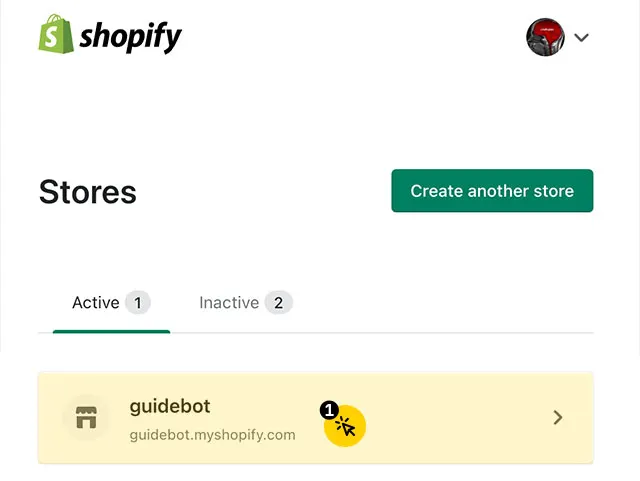
Log in to the Shopify admin interface and select the website for your domain.
2
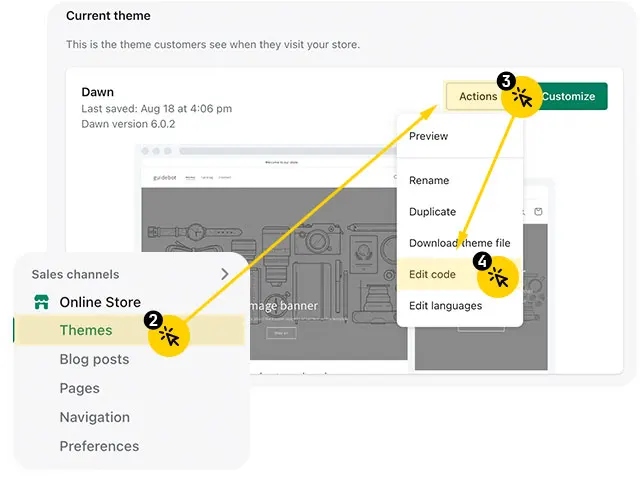
From the left menu, select "Online Store/Themes".
3
Click the "Actions" drop-down menu on the current theme tile.
4
Click "Edit Code".
5
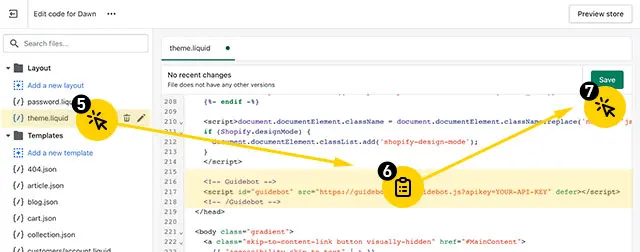
Click on the "Layout" file in the file list on the left.
6
Insert the Guidebot embed code directly before the </head> tag.
7
Click "Save".
Done.